Practical AI uses at work: 7 things you can try this week

Practical AI uses at work

By Omega Academy · 3 min read

You do not need to be technical to get value from AI tools. Here are seven everyday ways professionals use them, with simple prompts you can adapt. Try one this week and see how much time it saves.
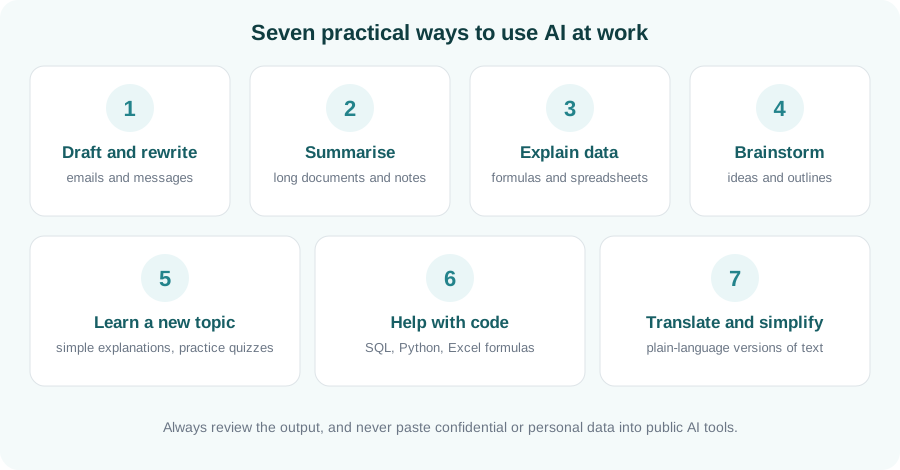
Seven practical uses of AI: draft and rewrite, summarise, explain data, brainstorm, learn a topic, help with code, translate and simplify
Seven practical ways to use AI at work.

1. Draft and rewrite messages

Ask for a first draft of an email, then adjust the tone. Try: “Rewrite this email to sound polite but firm, and keep it under 100 words.”

2. Summarise long documents and notes

Paste in non-confidential meeting notes or an article and ask for the key points, decisions and next steps in a short list.

3. Explain data and formulas

Describe what you want a spreadsheet to do and ask for the formula, or ask the AI to explain a formula you inherited, step by step.

4. Brainstorm ideas and outlines

Use it to get unstuck: ask for ten possible titles, a presentation outline, or the pros and cons of an approach. Treat the list as a starting point.

5. Learn a new topic

Ask for an explanation “as if I am new to this”, then ask it to quiz you. Following up with questions makes it feel like a patient tutor.

6. Get help with code

For SQL, Python or Excel, ask it to write a small example, explain an error message, or tidy up your code. Always test what it gives you.

7. Translate and simplify

Turn technical text into plain language, or adapt a message for a different audience, without starting from scratch.

Use it safely: never paste confidential, personal or client information into public AI tools, check facts and figures before relying on them, and follow your organisation’s AI policy. You remain responsible for the final result.

Key takeaways

  • Start with low-risk tasks: drafting, summarising and explaining.
  • Give clear context and say what format you want back.
  • Check the output, especially facts, numbers and code.
  • Protect confidential and personal data.

Go beyond the basics

Learn prompting, practical workflows and responsible use in our Generative AI Fundamentals course.

Enquire about AI training
AI vs RPA: what is the difference?

AI vs RPA: what is the difference?

By Omega Academy · 3 min read

People often use “AI” and “RPA” as if they meant the same thing, because both are described as automation. They are different tools for different jobs. The simplest way to remember it: RPA follows rules you write, while AI works out patterns from data.

The key differences

RPA AI (for example generative AI)
How it works Follows explicit, step-by-step rules Predicts or generates based on patterns learned from data
Best with Structured data and fixed screens Text, documents and varied input
Same input, same output? Yes, predictable every time Not always; answers can vary
Handles change Needs updating if the process changes Copes with variation, but can make mistakes
You need to check That the rules are right That the output is accurate and appropriate
Typical use Data entry, reports, system updates Drafting, summarising, classifying, answering questions

Where does your task sit?

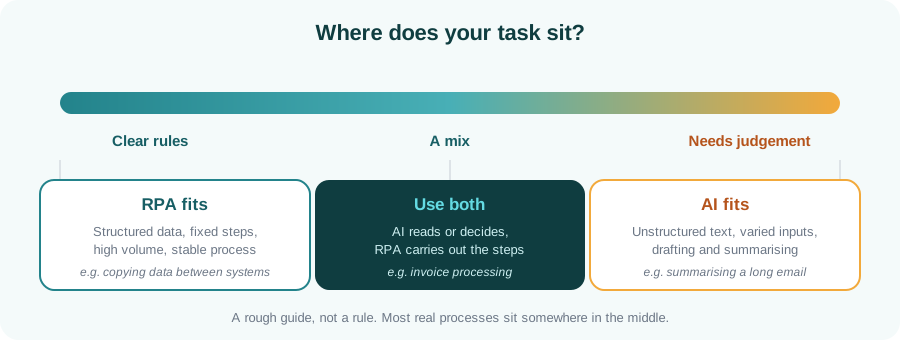
Think of a spectrum. Tasks with clear rules sit at one end and suit RPA. Tasks that need judgement or deal with unstructured text sit at the other end and suit AI. Many real processes sit in the middle and benefit from both.

Spectrum from clear rules, where RPA fits, to needs judgement, where AI fits, with a middle zone using both
A rough guide to choosing a tool.

Questions to ask before you choose

  • Can you write the steps down as clear rules?
  • Is the information structured, such as fields in a system, or free text?
  • How costly is a wrong result, and can someone check it easily?
  • Do you need the same result every time, with a clear record of why?

They are partners, not rivals

In practice the strongest solutions combine them: AI interprets the messy input and RPA carries out the follow-up steps. Our article on AI and RPA together walks through an example.

Key takeaways

  • RPA follows rules; AI learns patterns and handles ambiguity.
  • Use RPA for predictable, structured work and AI for language and judgement.
  • AI output needs checking; RPA rules need to be correct.
  • Combining them often gives the best result.

Not sure which to learn?

Tell us your background and goals and we will suggest a path, or browse all courses.

Ask us which course suits you

AI and RPA together: intelligent automation explained

AI plus RPA: intelligent automation

By Omega Academy · 3 min read

RPA is excellent at following clear rules, but it struggles with messy input such as free-form emails or scanned documents. AI is good at reading and judging that kind of content. Combined, they are often called intelligent automation.

What each one brings

RPA contributes AI contributes
Following fixed steps reliably Reading unstructured text and documents
Working across applications and screens Classifying and summarising content
Scheduling, logging and error handling Handling variation in how information is written
Updating systems of record Suggesting a decision or a draft

An example: processing supplier invoices

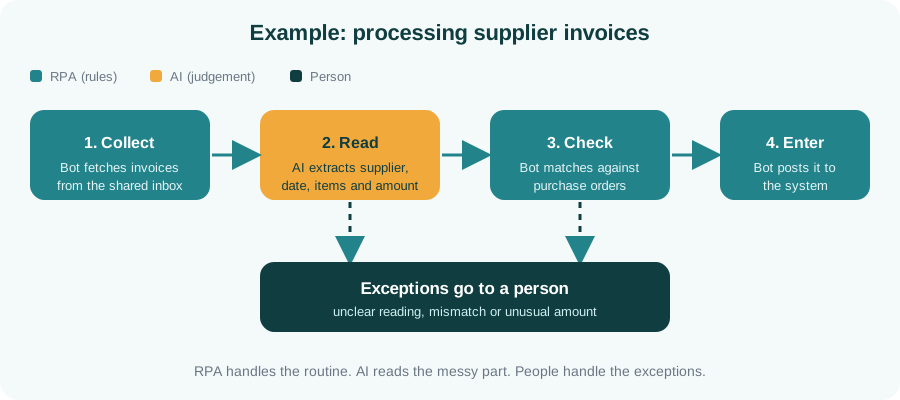
Imagine invoices arriving by email in many different layouts. A bot collects them, AI reads the details from each one, the bot checks them against purchase orders and posts them to the finance system, and anything unclear goes to a person.

Pipeline showing a bot collecting invoices, AI reading them, a bot checking and entering them, and exceptions going to a person
RPA handles the routine, AI reads the messy part, and people handle the exceptions.

Other places this combination helps

  • Sorting and routing customer emails and support tickets
  • Classifying incoming documents
  • Summarising case notes for a reviewer
  • Extracting details from forms and applications

Keep a person in the loop

AI can be wrong, so well-designed automations include safeguards. They set a confidence level below which work is sent to a person, keep a clear audit trail of what was done, and make it easy for staff to correct mistakes. The aim is to remove the repetitive load, not to remove accountability.

Tip: start with one process, measure how often it needs human help, and widen the automation gradually as trust builds.

Key takeaways

  • RPA follows rules; AI handles messy content and judgement.
  • Together they can automate processes that neither handles well alone.
  • Route uncertain cases to people and keep an audit trail.
  • Learn both: RPA to build the workflow, AI to make it smarter.

Generative AI explained: what it is and how it works

Generative AI explained

By Omega Academy · 3 min read

Generative AI is software that creates new content, such as text, images or code, from a written request. It has moved from research labs into everyday work very quickly. Here is what it is, how it works at a high level, and what to watch out for.

How it works, in plain English

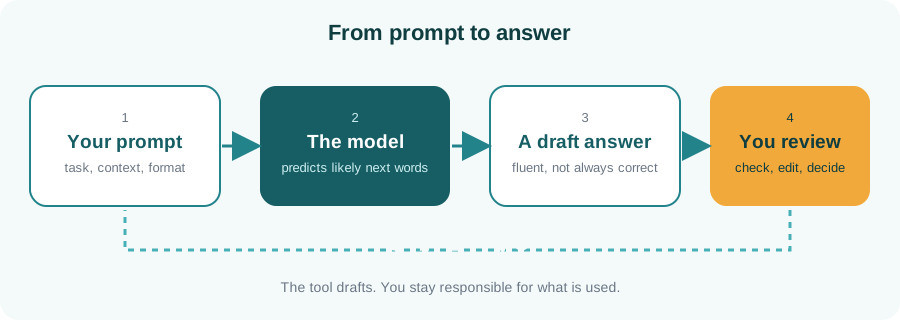
Tools like ChatGPT, Claude and Gemini are built on large language models. A model is trained on a very large amount of text and learns the patterns of language. When you give it a prompt, it predicts the most likely next words, one after another, to build a reply. It is not looking up a stored answer, which is why the same question can produce a slightly different answer each time.

Diagram: your prompt goes to the model, which produces a draft answer that you review
The tool drafts and you review.

What it is good at

  • Drafting and rewriting emails, reports and messages
  • Summarising long documents and meeting notes
  • Explaining a concept at your level
  • Brainstorming ideas and outlines
  • Helping with code, SQL and spreadsheet formulas
  • Translating and simplifying text

What to be careful about

Risk What it means for you
Wrong answers Models can sound confident and still be wrong. Check facts, figures and sources.
Privacy Do not paste confidential, personal or client data into public tools. Follow your organisation’s policy.
Bias Outputs can reflect biases in the data the model learned from. Review sensitive content carefully.
Over-reliance It is an assistant, not a decision maker. You remain accountable for the result.

Prompting basics

A clear prompt gets a better answer. A good prompt usually includes the role you want the AI to take, the task, some context, and the format you want back.

Example: “You are a friendly HR assistant. Write a short email welcoming a new employee who starts on Monday. Mention that their laptop will be ready at reception. Keep it under 120 words and use a warm, professional tone.”

If the first answer is not right, say what to change and try again. Treating it as a conversation works much better than expecting a perfect answer first time.

Key takeaways

  • Generative AI predicts likely text from patterns; it does not look up facts.
  • It is excellent for drafts, summaries and explanations.
  • Always verify important output and protect confidential data.
  • Clear prompts with context and format give much better results.

Ready to use AI with confidence?

Our Generative AI Fundamentals course covers prompting, practical use and responsible practice.

Enquire about AI training
What is RPA? A beginner’s guide

What is RPA? A beginner's guide

By Omega Academy · 3 min read

Robotic process automation, or RPA, uses software “bots” to do repetitive computer tasks the way a person would: opening applications, copying data, filling in forms and sending emails. No physical robots are involved, just software following clear instructions.

How an RPA bot works

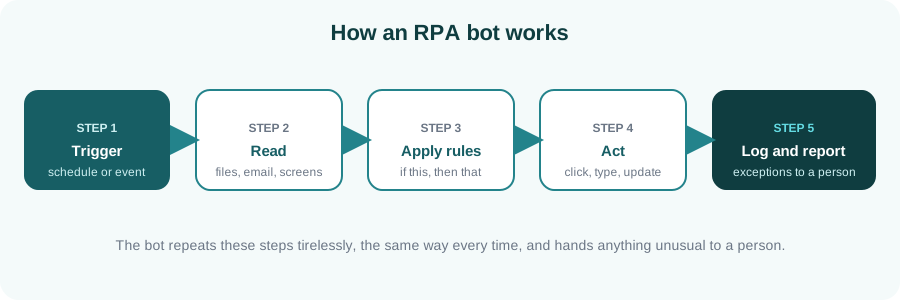
An RPA bot works through the same screens and files that you use, so it can automate work across applications that were never designed to talk to each other. Most bots follow the same five steps.

Diagram of an RPA bot: trigger, read, apply rules, act, log and report
A typical RPA bot: the same steps, the same way, every time.

Where RPA works well

RPA suits work that is repetitive, rule-based and done on a computer. Typical examples include:

  • Entering invoice or order data into an accounting system
  • Producing and emailing regular reports
  • Moving data between two systems that do not integrate
  • Carrying out the repetitive steps of employee onboarding
  • Reconciling figures between spreadsheets and applications

Is your process a good candidate?

Good candidate Poor candidate
Follows clear, written rules Needs frequent human judgement
Done often, in high volume Rare or one-off
Uses structured digital data Relies on handwriting or free-form text
Stable, rarely changes Changes every few weeks
Tip: fix the process first, then automate it. Automating a confusing process only produces confusing results faster.

What does an RPA developer do?

An RPA developer studies a process with the people who run it, designs the automation, builds and tests it, deploys it and keeps it running when applications change. Popular platforms include UiPath, Blue Prism and Automation Anywhere, and the core ideas carry across all of them. Because tools are visual, beginners can build a first working bot much sooner than they could write the same logic in code.

Key takeaways

  • RPA bots follow rules to do repetitive work across applications.
  • It suits high-volume, stable, rule-based processes with structured data.
  • Tidy up the process before you automate it.
  • The skills transfer between RPA platforms.

Want to build your first bot?

See our RPA with UiPath course, or tell us about your background and we will suggest a starting point.

Enquire about RPA training

RPA or Python: which should you learn first?

RPA versus Python

By Omega Academy · 3 min read

Robotic process automation (RPA) and Python are both used to automate work, so people often wonder which to learn first. They overlap, but they are not the same thing, and the right starting point depends on what you want to do.

What RPA tools are good at

RPA platforms such as UiPath let you build automations visually. They are designed for business processes that move data between applications, fill in forms, read emails and process documents, often through the screen the way a person would. You can get a first working bot quickly, and the tools include scheduling, monitoring and error handling.

What Python is good at

Python is a general-purpose programming language. You can use it to process files, work with data, call web services, build small tools and much more. It takes longer to get started than a visual tool, but it has no ceiling, and the skill carries over to data analysis, testing and many other roles.

Side by side

RPA (for example UiPath) Python
Style Visual workflows Written code
First result Usually quick Takes longer to get going
Best at Moving data between applications, forms, emails and documents Data processing, custom logic, web services and files
Built-in extras Scheduling, monitoring, error handling You add what you need
Flexibility Within the platform Very high
Carries over to Process automation roles Data, testing, automation and more
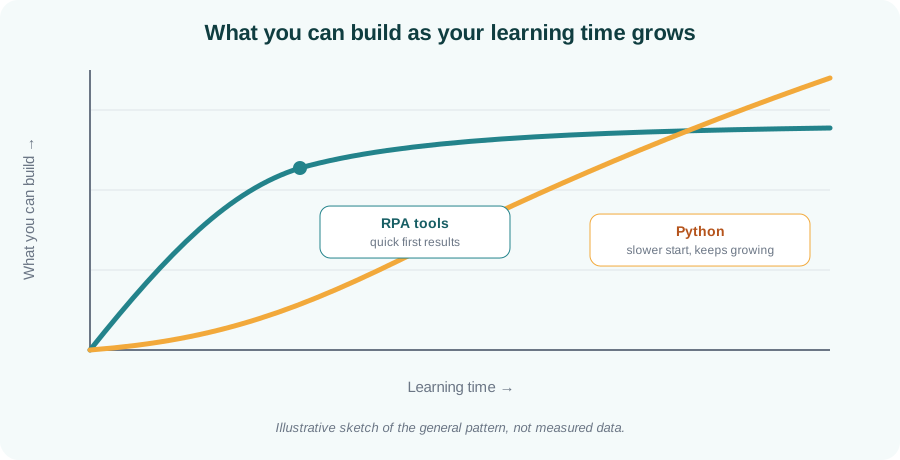
Illustrative chart showing RPA tools giving quick early results while Python starts slower and keeps growing
The general pattern: quick early wins with RPA tools, higher long-term headroom with Python.

How to choose

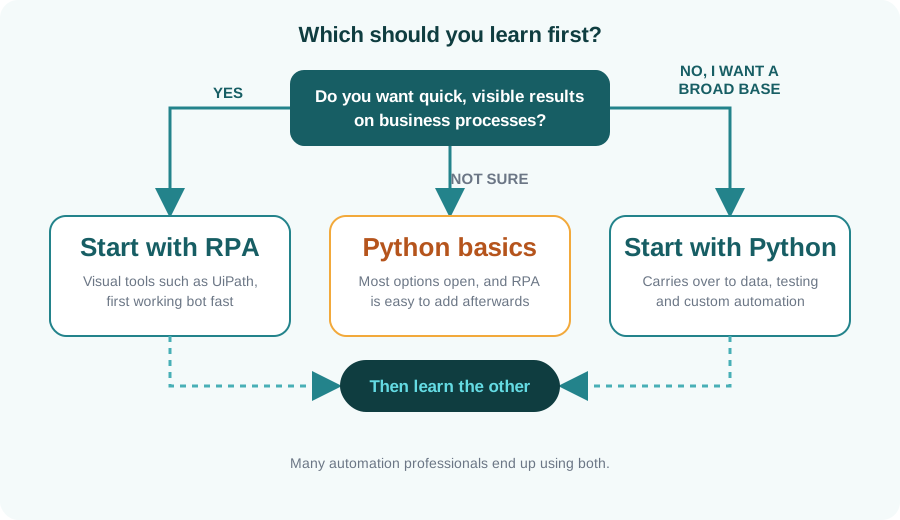
Use this quick guide. If you are unsure, Python basics keep the most options open, and an RPA tool is easy to pick up afterwards.

Decision flowchart: start with RPA for quick results on business processes, with Python for a broad base, or Python basics if unsure
A simple decision guide for your first automation skill.

You may end up using both

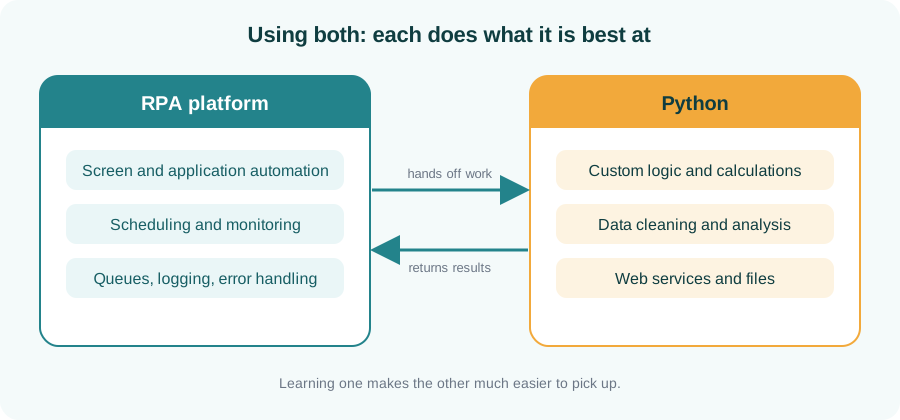
Many automation professionals use both: an RPA platform for user-interface work, scheduling and monitoring, and Python for custom logic and data handling. Learning one makes the other much easier.

Diagram of an RPA platform and Python working together, handing work to each other
Each tool does what it is best at.

Key takeaways

  • RPA tools give quick, visible results on business processes.
  • Python is slower to start but far more flexible and widely useful.
  • Unsure? Begin with Python basics and add RPA later.
  • Both together is a common and powerful combination.

Ready to start automating?

See the details of our RPA and Python courses, or ask us which fits your goals.

Enquire about RPA or Python

How to choose your first IT skill

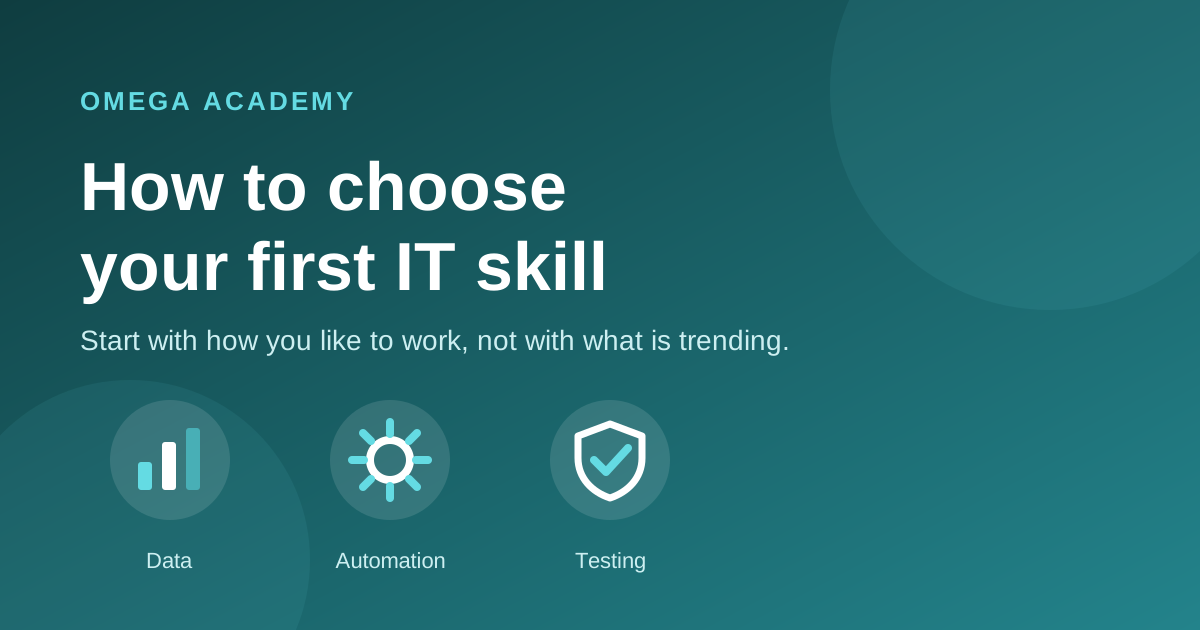
Three paths into IT: data, automation and testing

By Omega Academy · 3 min read

Many people start an IT learning journey by asking which skill is hottest right now. That is a hard question to answer, and the answer keeps changing. A better question is which skill suits the way you like to work.

Start with how you like to work

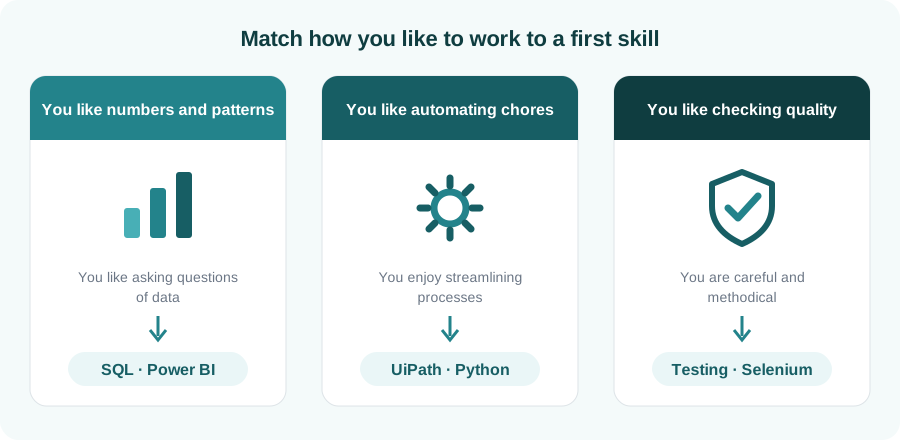
Most entry-level IT skills fall into three broad families. Look at the three cards below and see which one sounds most like you.

Diagram matching three working styles to first skills: SQL and Power BI, UiPath and Python, testing and Selenium
Match your working style to a sensible first skill.
Quick test: think of a task you enjoyed at work or in college. Was it spotting a trend in a spreadsheet, getting rid of a boring manual step, or catching a mistake before anyone else did? That instinct usually points to your best starting point.

Pick a skill with a clear first project

The best first skill is one where you can build something small within a few weeks. A visible result keeps you motivated far more than a long list of topics. Here are realistic first projects for each skill:

Skill A good first project
SQL Answer a handful of business questions from a sample sales database.
Power BI Turn a messy spreadsheet into a clean, interactive dashboard.
Python Write a script that renames and organises a folder of files.
RPA (UiPath) Build a bot that copies data from a spreadsheet into a web form.
Selenium Write an automated test that checks a login page.

Do not try to learn everything at once

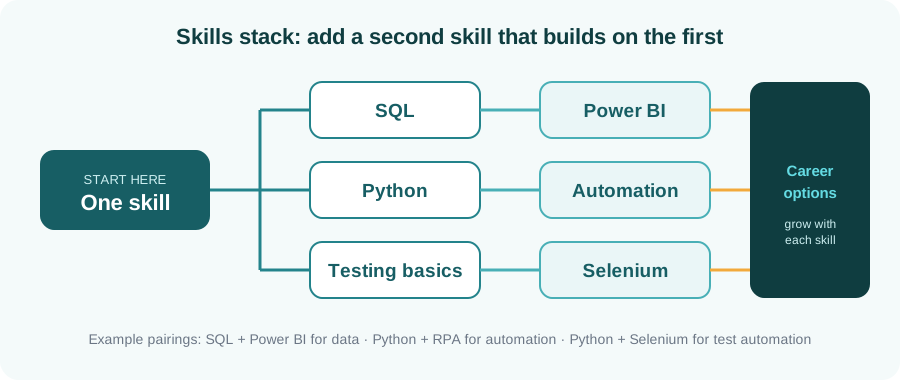
Choose one skill, practise it until you are comfortable, then add a second that builds on it. Skills stack: SQL pairs naturally with Power BI, and Python pairs well with both data work and automation. A focused start beats a scattered one.

Diagram showing SQL leading to Power BI, Python to automation and testing basics to Selenium
One skill first, then a second that builds on it.

Learn with feedback

Self-study works for some people, but a trainer who reviews your work and answers questions saves a lot of time, especially at the beginning. Look for live, hands-on sessions, practice exercises, and a way to prove what you learned.

Key takeaways

  • Choose by working style first, trends second.
  • Pick a skill where you can finish a small project within weeks.
  • Add a second skill that builds on the first, not a random new one.
  • Learn with feedback from someone who reviews your work.

Not sure where to begin?

Tell us about your background and goals, and we will suggest a starting point. You can also browse all Omega Academy courses.

Talk to us about your first course