Becoming a data analyst: a skills roadmap

Becoming a data analyst: a skills roadmap

By Omega Academy · 3 min read

Data analysts turn raw numbers into answers that help people make decisions. The role draws on a handful of core skills, and you can learn them in a sensible order without feeling overwhelmed.

What a data analyst actually does

A typical week involves collecting data from a few sources, cleaning it, finding patterns, and presenting the findings clearly to colleagues who are not data specialists. That mix explains the skill list: tools to handle data, plus the ability to explain what it means.

The roadmap

Here is a practical order. Each step builds on the one before it, and each has an obvious small project to prove you can do it.
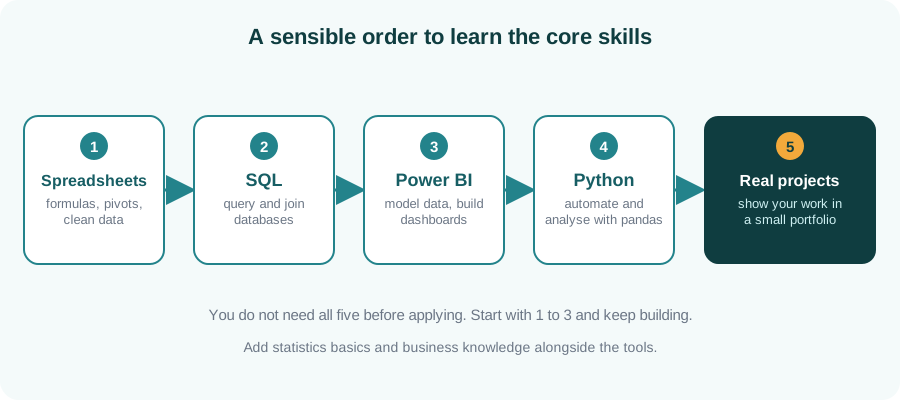
Roadmap: spreadsheets, SQL, Power BI, Python and real projects
A sensible order to learn the core skills.

What each step is for

Skill What you use it for A good first project
Spreadsheets Quick analysis, formulas, pivot tables Clean and summarise a messy sales sheet
SQL Getting data out of databases Answer five business questions with queries
Power BI Dashboards and shared reports Build a one-page sales dashboard
Python Automation and deeper analysis Automate a weekly report from a CSV file

Skills that are not tools

Do not skip the human side. Curiosity, basic statistics and the ability to explain a finding in plain language matter as much as any software. A clear chart and a short explanation beat a clever model nobody understands.

Show your work

Two or three small projects, each with a short write-up of the question, your method and what you found, are far more convincing than a list of tool names. Use data you are allowed to share, such as public datasets.

Key takeaways

  • Start with spreadsheets, then SQL, then a dashboard tool, then Python.
  • You can apply for roles once you have the first few skills and a project or two.
  • Communication and curiosity matter as much as tools.
  • Small, well-explained projects are your best proof.

Build the core skills with a trainer

Explore our SQL, Power BI and Python courses.

Enquire about data courses
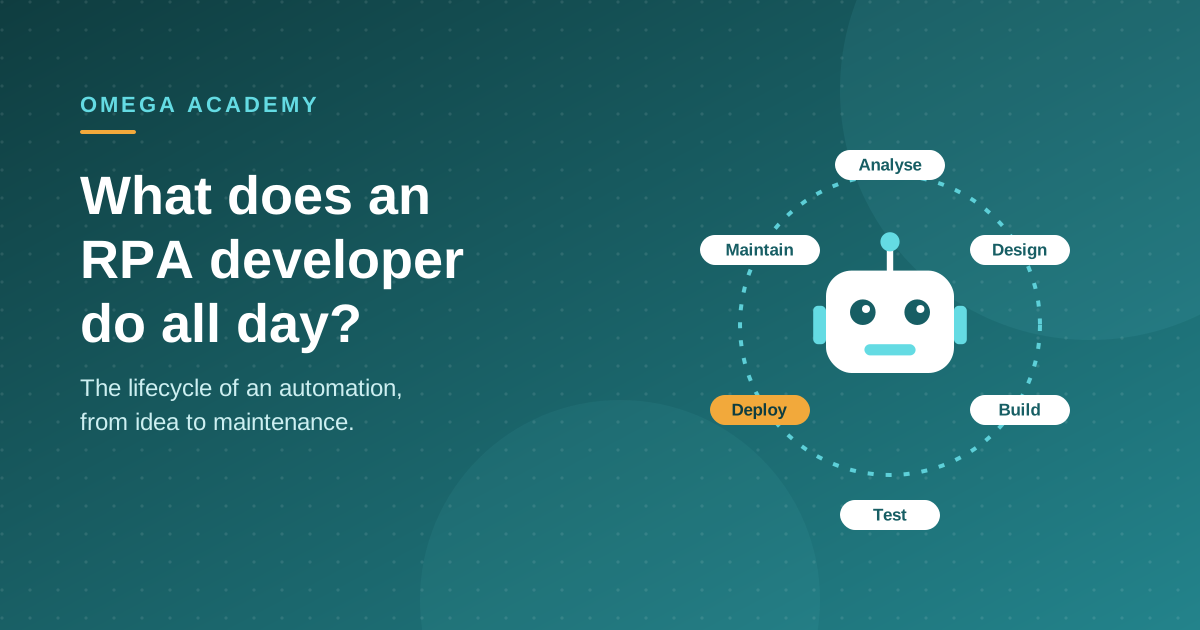
What does an RPA developer do all day?

What does an RPA developer do all day? The lifecycle of an automation

By Omega Academy · 3 min read

Job titles can hide what the work really looks like. An RPA developer does far more than drag activities onto a canvas. Most of the job is understanding a process well enough to automate it reliably, and then keeping it running.

The life of an automation

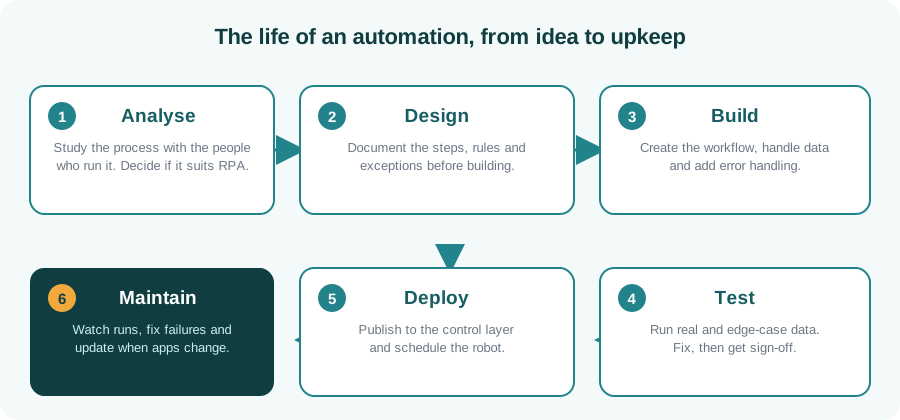
Almost every RPA project follows the same six stages, whichever platform it uses. A developer moves between them, and often works on several projects at different stages in the same week.

Six stages of an RPA project: analyse, design, build, test, deploy and maintain
From idea to upkeep: the six stages of an RPA project.

A typical week

Activity What it involves
Talking to process owners Walking through a task step by step and asking what happens when something goes wrong.
Documenting Writing down the steps, rules and exceptions so everyone agrees what the robot should do.
Building and testing Creating the workflow, handling data and trying it against real and awkward cases.
Monitoring Checking runs, reading logs and fixing failures, often caused by a changed screen or file.
The surprise for most newcomers: a large share of the time goes on exceptions, such as a missing file, a slow page or unexpected data. Good developers plan for these from the start.

Skills that matter

  • Process thinking: breaking a task into clear, repeatable steps.
  • Attention to detail: small rules decide whether a bot works.
  • Communication: explaining what can and cannot be automated.
  • Tool knowledge: a platform such as UiPath or Blue Prism, plus data handling basics.

Key takeaways

  • RPA work follows six stages, from analysis to maintenance.
  • Much of the job is talking to people and handling exceptions.
  • Process thinking and attention to detail matter as much as the tool.
  • Maintenance is ongoing, because applications change.

Start your RPA career

Learn the full lifecycle with RPA with AI – UiPath or RPA with AI – Blue Prism.

Enquire about RPA training

Power BI or Excel: which for which job?

Power BI or Excel: which for which job?

By Omega Academy · 3 min read

People often ask whether Power BI replaces Excel. It does not. They are built for different jobs, and many teams use both every day. Knowing which to reach for saves time and avoids reports that are hard to maintain.

Where Excel is strongest

Excel is a flexible grid. It is ideal for quick calculations, one-off analysis, small lists, budgets and anywhere you want to type, tweak and see results immediately. Most people already know it, which makes it the natural place to explore a new set of numbers.

Where Power BI is strongest

Power BI is designed for repeatable reporting. It connects to several sources, cleans and combines the data, and publishes interactive dashboards that colleagues can filter themselves. When the data changes, you refresh instead of rebuilding.

Side by side

Excel Power BI
Best for Quick analysis, small datasets, ad-hoc work Dashboards, repeatable reports, larger datasets
Sharing Send or share a file Publish once; colleagues explore online
Updating Often manual Refresh from the source
Interactivity Filters and pivot tables Slicers, drill-down, cross-filtering
Learning curve Familiar to most people New concepts such as data modelling and DAX

What a Power BI workflow looks like

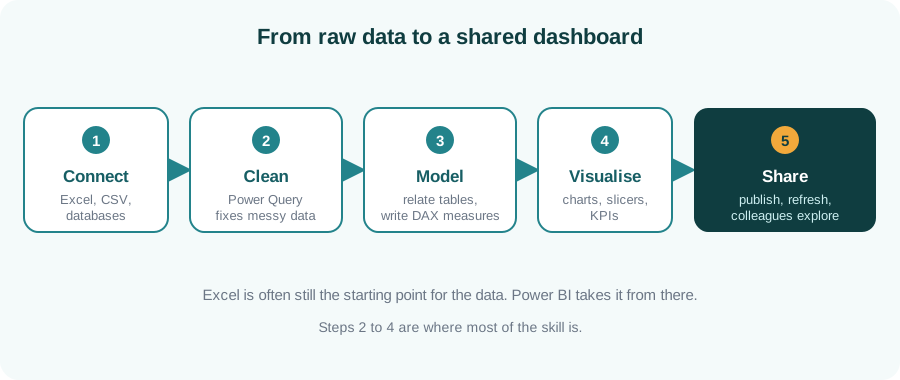
Most of the effort goes into steps two to four: cleaning the data, modelling it and choosing the right visuals. That is also where the real skill lies.

Five-step Power BI workflow: connect, clean, model, visualise and share
From raw data to a shared dashboard in five steps.

A simple rule of thumb

Use Excel to explore and Power BI to share. If you will build the same report again next week, or many people need to look at it, it is probably time for Power BI. If it is a one-off question, Excel is usually faster.

Key takeaways

  • Excel and Power BI complement each other; it is rarely either-or.
  • Excel suits quick, flexible, one-off work.
  • Power BI suits repeatable, shared, interactive reporting.
  • The core Power BI skills are cleaning, modelling and visualising.

Ready to build your first dashboard?

Our Power BI & Data Analytics course covers data cleaning, modelling, DAX and dashboard design.

Enquire about Power BI training

Generative AI explained: what it is and how it works

Generative AI explained

By Omega Academy · 3 min read

Generative AI is software that creates new content, such as text, images or code, from a written request. It has moved from research labs into everyday work very quickly. Here is what it is, how it works at a high level, and what to watch out for.

How it works, in plain English

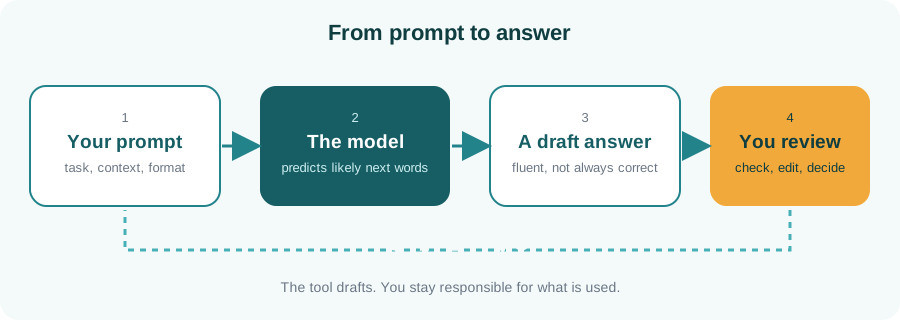
Tools like ChatGPT, Claude and Gemini are built on large language models. A model is trained on a very large amount of text and learns the patterns of language. When you give it a prompt, it predicts the most likely next words, one after another, to build a reply. It is not looking up a stored answer, which is why the same question can produce a slightly different answer each time.

Diagram: your prompt goes to the model, which produces a draft answer that you review
The tool drafts and you review.

What it is good at

  • Drafting and rewriting emails, reports and messages
  • Summarising long documents and meeting notes
  • Explaining a concept at your level
  • Brainstorming ideas and outlines
  • Helping with code, SQL and spreadsheet formulas
  • Translating and simplifying text

What to be careful about

Risk What it means for you
Wrong answers Models can sound confident and still be wrong. Check facts, figures and sources.
Privacy Do not paste confidential, personal or client data into public tools. Follow your organisation’s policy.
Bias Outputs can reflect biases in the data the model learned from. Review sensitive content carefully.
Over-reliance It is an assistant, not a decision maker. You remain accountable for the result.

Prompting basics

A clear prompt gets a better answer. A good prompt usually includes the role you want the AI to take, the task, some context, and the format you want back.

Example: “You are a friendly HR assistant. Write a short email welcoming a new employee who starts on Monday. Mention that their laptop will be ready at reception. Keep it under 120 words and use a warm, professional tone.”

If the first answer is not right, say what to change and try again. Treating it as a conversation works much better than expecting a perfect answer first time.

Key takeaways

  • Generative AI predicts likely text from patterns; it does not look up facts.
  • It is excellent for drafts, summaries and explanations.
  • Always verify important output and protect confidential data.
  • Clear prompts with context and format give much better results.

Ready to use AI with confidence?

Our Generative AI Fundamentals course covers prompting, practical use and responsible practice.

Enquire about AI training

RPA or Python: which should you learn first?

RPA versus Python

By Omega Academy · 3 min read

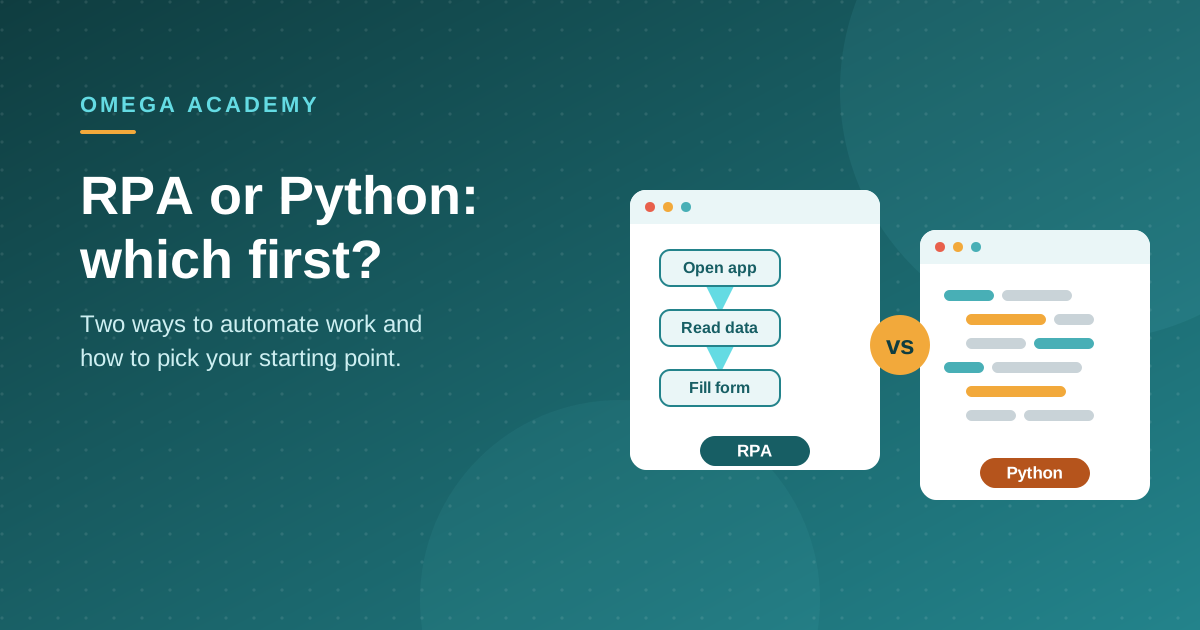
Robotic process automation (RPA) and Python are both used to automate work, so people often wonder which to learn first. They overlap, but they are not the same thing, and the right starting point depends on what you want to do.

What RPA tools are good at

RPA platforms such as UiPath let you build automations visually. They are designed for business processes that move data between applications, fill in forms, read emails and process documents, often through the screen the way a person would. You can get a first working bot quickly, and the tools include scheduling, monitoring and error handling.

What Python is good at

Python is a general-purpose programming language. You can use it to process files, work with data, call web services, build small tools and much more. It takes longer to get started than a visual tool, but it has no ceiling, and the skill carries over to data analysis, testing and many other roles.

Side by side

RPA (for example UiPath) Python
Style Visual workflows Written code
First result Usually quick Takes longer to get going
Best at Moving data between applications, forms, emails and documents Data processing, custom logic, web services and files
Built-in extras Scheduling, monitoring, error handling You add what you need
Flexibility Within the platform Very high
Carries over to Process automation roles Data, testing, automation and more
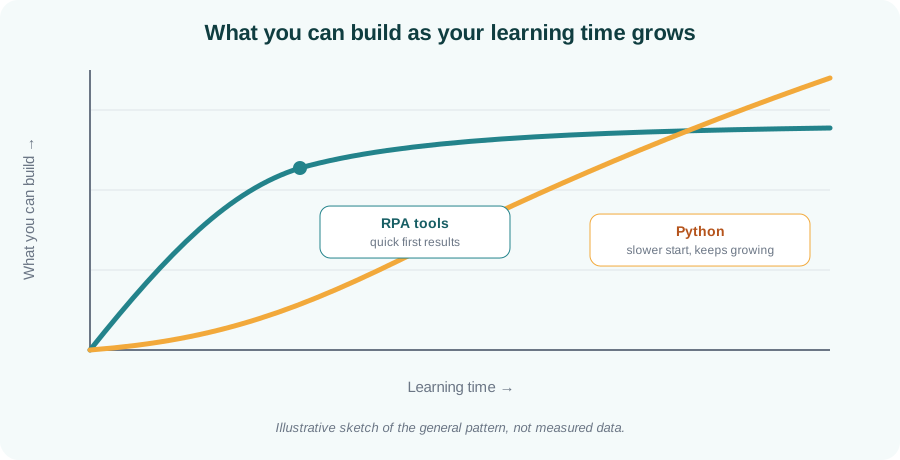
Illustrative chart showing RPA tools giving quick early results while Python starts slower and keeps growing
The general pattern: quick early wins with RPA tools, higher long-term headroom with Python.

How to choose

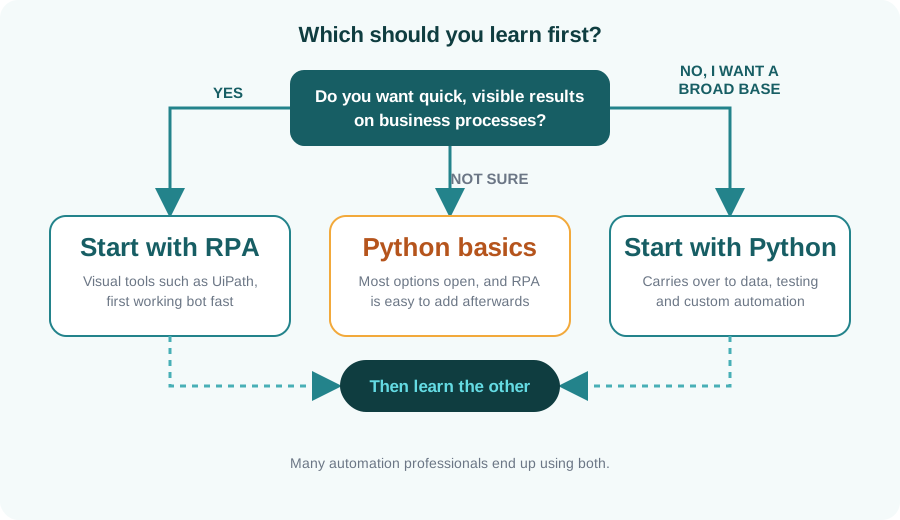
Use this quick guide. If you are unsure, Python basics keep the most options open, and an RPA tool is easy to pick up afterwards.

Decision flowchart: start with RPA for quick results on business processes, with Python for a broad base, or Python basics if unsure
A simple decision guide for your first automation skill.

You may end up using both

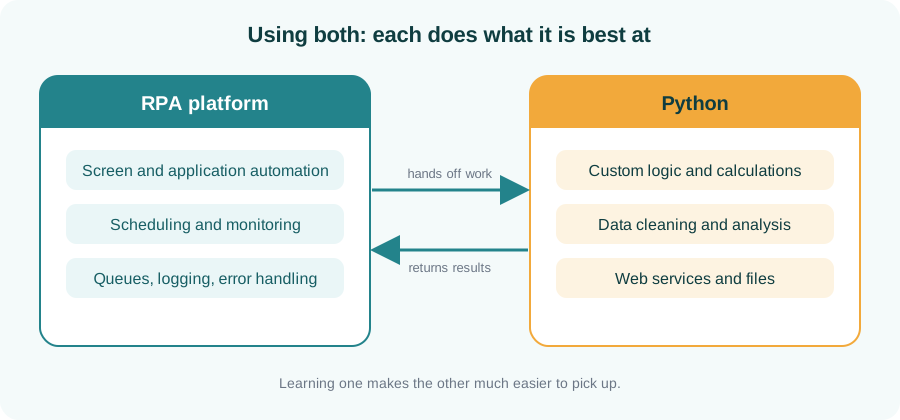
Many automation professionals use both: an RPA platform for user-interface work, scheduling and monitoring, and Python for custom logic and data handling. Learning one makes the other much easier.

Diagram of an RPA platform and Python working together, handing work to each other
Each tool does what it is best at.

Key takeaways

  • RPA tools give quick, visible results on business processes.
  • Python is slower to start but far more flexible and widely useful.
  • Unsure? Begin with Python basics and add RPA later.
  • Both together is a common and powerful combination.

Ready to start automating?

See the details of our RPA and Python courses, or ask us which fits your goals.

Enquire about RPA or Python

SQL basics: the five clauses to learn first

SQL basics: the five clauses to learn first

By Omega Academy · 3 min read

SQL is the language used to ask questions of data stored in databases. It looks intimidating at first, but most everyday queries are built from just five clauses. Learn those and you can already answer a surprising number of business questions.

One clause, one job

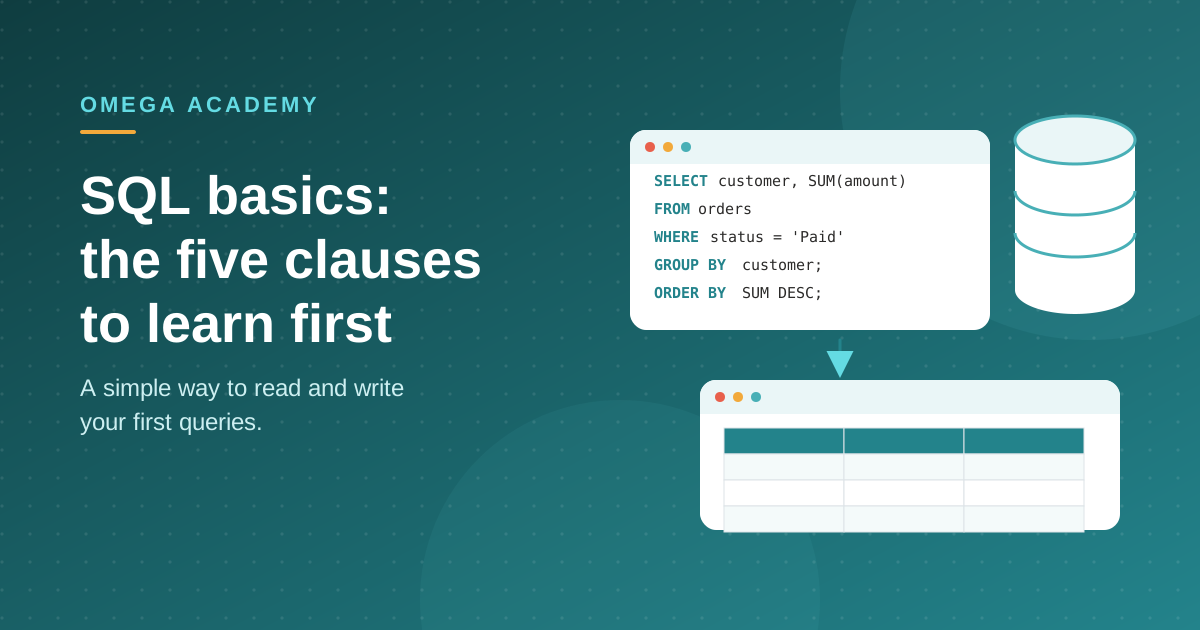
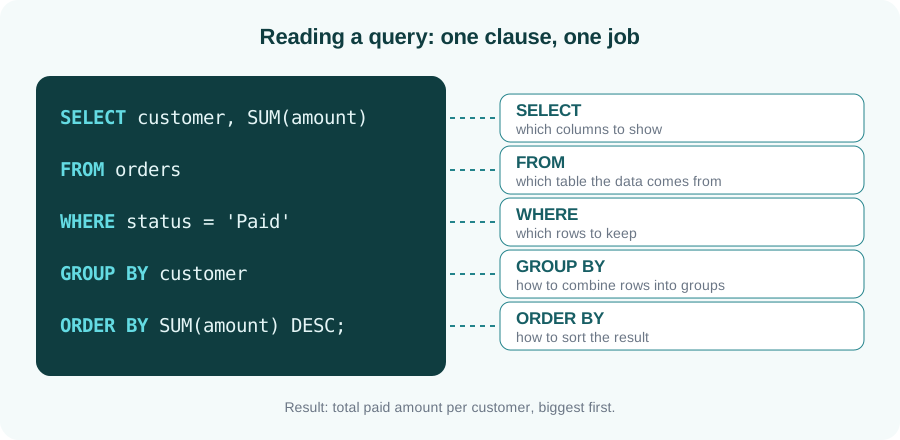
A query reads almost like an English sentence. Each clause has a single, clear purpose, and you can read them top to bottom.

A SQL query broken into SELECT, FROM, WHERE, GROUP BY and ORDER BY, with a one-line explanation of each
The five clauses and what each one does.
Tip: write queries in the order you would explain them aloud. First decide what you want to see, then where it lives, then which rows matter, and finally how to group and sort it.

The clauses at a glance

Clause Question it answers Example
SELECT Which columns do I want? customer, amount
FROM Which table holds the data? orders
WHERE Which rows should be included? status = ‘Paid’
GROUP BY How should rows be combined? one row per customer
ORDER BY In what order should results appear? largest total first

The next step: joins

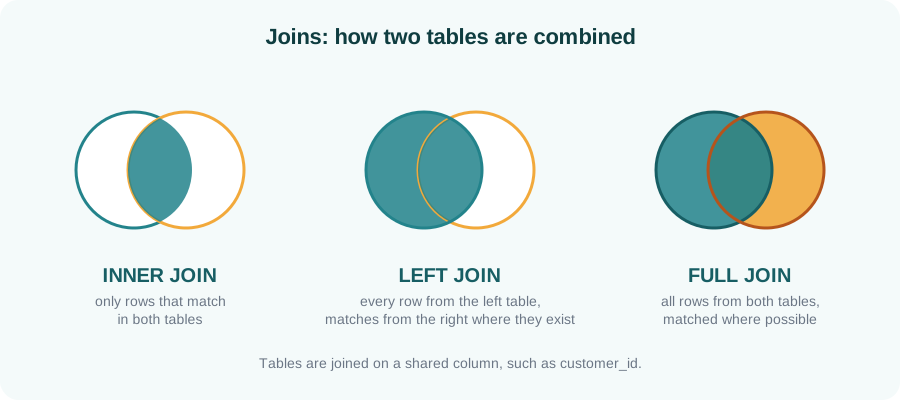
Real data is usually spread across several tables, for example customers in one and orders in another. A join combines them using a shared column such as a customer ID. The three joins below cover most situations you will meet.

Diagram of inner, left and full joins using overlapping circles
Inner, left and full joins differ in which rows they keep.

How to practise

Pick a small dataset you understand, such as a sales or attendance sheet, load it into a practice database and write five questions you would like answered. Turn each into a query. Checking your result against what you expected is the quickest way to learn.

Key takeaways

  • Most queries are built from SELECT, FROM, WHERE, GROUP BY and ORDER BY.
  • Read and write them in the order you would explain the question.
  • Joins combine tables through a shared column.
  • Practise with questions you already know the answers to.

Want to learn SQL properly?

Our SQL for Data Professionals course takes you from first query to joins and analysis with trainer feedback.

Enquire about SQL training